MyBatis学习笔记

最近学习 MyBatis 这个轻量型持久层框架,感觉入门很简单,但是深层次细节配置很多。本篇笔记从 配置文件->例子入门->MyBatis 传参和取参->查询结果返回类型->关联数据查询->关联数据查询策略(是否启用懒加载)->动态 SQL->一级缓存和二级缓存来进行一次 MyBatis 探寻。
一、概念简介
MyBatis 是一款优秀的持久层框架,它支持定制化 SQL、存储过程以及高级映射。MyBatis 避免了几乎所有的 JDBC 代码和手动设置参数以及获取结果集。MyBatis 可以使用简单的 XML 或注解来配置和映射原生信息,将接口和 Java 的 POJOs(Plain Old Java Objects,普通的 Java 对象)映射成数据库中的记录。
下载地址:https://github.com/mybatis/mybatis-3
MyBatis 文档:http://www.mybatis.org/mybatis-3/zh/index.html
mybatis-spring 文档:http://www.mybatis.org/spring/zh/index.html
开始总结前先导入 Maven 依赖
<dependencies>
	<dependency>
		<groupId>org.mybatis</groupId>
		<artifactId>mybatis</artifactId>
		<version>3.4.6</version>
	</dependency>

	<dependency>
		<groupId>mysql</groupId>
		<artifactId>mysql-connector-java</artifactId>
		<version>5.1.47</version>
	</dependency>

	<dependency>
		<groupId>log4j</groupId>
		<artifactId>log4j</artifactId>
		<version>1.2.17</version>
	</dependency>
</dependencies>
二、总配置文件
在 classpath 目录下面建立一个 MyBatis 配置文件,配置文件可以分为两个部分,第一部分数据库环境配置,第二部分加载映射文件。
文件名mybatis-config.xml。
<?xml version="1.0" encoding="UTF-8" ?>
<!DOCTYPE configuration
PUBLIC "-//mybatis.org//DTD Config 3.0//EN"
"http://mybatis.org/dtd/mybatis-3-config.dtd">
<configuration>
<!-- 加载外部 properties 文件 -->
<properties resource="jdbc.properties"></properties>
<environments default="debug">
<environment id="debug">
<transactionManager type="JDBC"></transactionManager>
<dataSource type="POOLED">
<property name="driver" value="com.mysql.jdbc.Driver" />
<property name="url"
value="jdbc:mysql://10.22.70.2:3306/database_chao?useUnicode=true&characterEncoding=utf8" />
<property name="username" value="xxx" />
<property name="password" value="xxx" />
</dataSource>
</environment>
<environment id="release">
<transactionManager type="JDBC"></transactionManager>
<dataSource type="POOLED">
<property name="driver" value="${driver}" />
<property name="url" value="${url}" />
<property name="username" value="${username}" />
<property name="password" value="${password}" />
</dataSource>
</environment>
</environments>
<mappers>
</mappers>
</configuration>
MyBatis 的配置文件包含了会深深影响 MyBatis 行为的设置(settings)和属性(properties)信息。文档的顶层结构如下:
---configuration 配置
-------properties 属性
-------settings 设置
-------typeAliases 类型别名
-------typeHandlers 类型处理器
-------plugins 插件
-------environments 环境
----------environment 环境变量
-------------transactionManager 事务管理器
-------------dataSource 数据源
-------------databaseIdProvider 数据库厂商标识
-------mappers 映射器
有关 properties、settings、typeAliases、typeHandlers 和 plugins 的配置及相关功能请参考 MyBatis 的官方文档 http://www.mybatis.org/mybatis-3/zh/configuration.html
三、例子入门
1. 简单例子入门
① 建立 POJO 类
public class Grade {
	private int gid;
	private String gname;
}
② 创建 POJO 对象和 Mysql 数据的表之间的映射配置
[在 POJO 同在包下]创建名字为 GradeMapper.xml 的 XML 文件
<?xml version="1.0" encoding="UTF-8" ?>
<!DOCTYPE mapper
  PUBLIC "-//mybatis.org//DTD Mapper 3.0//EN"
  "http://mybatis.org/dtd/mybatis-3-mapper.dtd">
<mapper namespace="primary">
	<select id="selectGrade" resultType="primary.Grade">
		select * from grade where gid=#{id}
	</select>
</mapper>
namespace 可以自己随便定,不要重复
<select> 标签里面的 id 也可以自己随便定,不要重复
③ 将映射配置加载到总配置文件中
在mybatis-config.xml文件中的<mappers> 标签下加入如下代码
<mappers>
	<mapper resource="primary/GradeMapper.xml" />
</mappers>
④ 代码测试
@Test
public void testSelectById() throws Exception {
	//加载 配置文件
	InputStream inputStream = Resources.getResourceAsStream("mybatis-config.xml");
	//初始化session工厂
	SqlSessionFactory sqlSessionFactory = new SqlSessionFactoryBuilder().build(inputStream);

	SqlSession sqlSession = sqlSessionFactory.openSession();
	//1. 执行SQL语句标签里面的 id为 映射配置里面的 namespace + 标签的id
	//2. 参数为映射文件里面执行sql语句需要的参数, 这里是id
	Object selectOne = sqlSession.selectOne("primary.selectGrade", 1);
	//3. MyBatis将查询数封装成要求的结果返回类型后再返回
	System.out.println(selectOne);

	sqlSession.close();
	inputStream.close();
}
2. 正规写法 实现简单增删改查功能
开发跟数据交互都是通过 Dao 层,MyBatis 为我们 Dao 层开发做了很好的兼容,我们直接写接口,然后用 Mapper 映射文件充当实现类。
① 先写接口
public interface GradeDao {
	public int insertGrade(Grade grade);
	public int updateGrade(Grade grade);
	public int deleteGrade(int id);
	public List<Grade> selectAll();
}
② 创建 POJO 对象和 Mysql 数据的表之间的映射配置
为了方便查看和加载配置文件,我们一般 Mapper 文件和对应的 Dao 接口放在同一个包下。
<?xml version="1.0" encoding="UTF-8"?>
<!DOCTYPE mapper PUBLIC "-//mybatis.org//DTD Mapper 3.0//EN" "mybatis-3-mapper.dtd" >
<mapper namespace="com.ogemray.dao.GradeDao">

	<insert id="insertGrade">
		insert into grade (gname) value (#{gname})
	</insert>

	<update id="updateGrade">
		update grade set gname=#{gname} where gid=#{gid}
	</update>

	<delete id="deleteGrade">
	 	delete from grade where gid=#{id}
	</delete>

	<select id="selectAll" resultType="com.ogemray.entity.Grade">
		select * from grade
	</select>
</mapper>
配置文件有些要注意的地方
mapper 的 namespace 要是 对应 Dao 接口的全名
SQL 语句标签里面的 id 要是 Dao 里面对应方法的名字
③ 测试代码
public class UpgradeTest {
	private InputStream inputStream;
	private SqlSession sqlSession;

	@Before
	public void beforeAction() throws Exception {
		inputStream = Resources.getResourceAsStream("mybatis-config.xml");
		SqlSessionFactory sessionFactory = new SqlSessionFactoryBuilder().build(inputStream);
		sqlSession = sessionFactory.openSession();
	}

	@After
	public void afterAction() throws Exception {
		sqlSession.commit();
		sqlSession.close();
		inputStream.close();
	}

	@Test
	public void testSimpleInsert() {
		Grade grade = new Grade("理科四班");
		GradeDao mapper = sqlSession.getMapper(GradeDao.class);
		int count = mapper.insertGrade(grade);
		System.out.println(count);
	}

	@Test
	public void testSimpleUpdate() {
		GradeDao mapper = sqlSession.getMapper(GradeDao.class);
		Grade grade = mapper.selectOneById(5);
		int count = grade.setGname("理科二班");
		mapper.updateGrade(grade);
	}

	@Test
	public void testSimpleDelete() {
		GradeDao mapper = sqlSession.getMapper(GradeDao.class);
		int count = mapper.deleteGrade(5);
	}

	@Test
	public void testSimpleSelectAll() {
		GradeDao mapper = sqlSession.getMapper(GradeDao.class);
		List<Grade> list = mapper.selectAll();
		for (Grade grade : list) { System.out.println(grade); }
	}
}
3. 得到新插入对象的 id 值
对于上面的 增 删 更新后面返回的都是影响行数,很多时候数据库主键自增长,但是我们要知道新插入对象对应数据库里面的 id 值,这个时候需要用到下面这两个属性。
| 属性 | 描述 |
|---|---|
| useGeneratedKeys | (仅对 insert 和 update 有用)这会令 MyBatis 使用 JDBC 的 getGeneratedKeys 方法来取出由数据库内部生成的主键(比如:像 MySQL 和 SQL Server 这样的关系数据库管理系统的自动递增字段),默认值:false。 |
| keyProperty | (仅对 insert 和 update 有用)唯一标记一个属性,MyBatis 会通过 getGeneratedKeys 的返回值或者通过 insert 语句的 selectKey 子元素设置它的键值,默认:unset。如果希望得到多个生成的列,也可以是逗号分隔的属性名称列表。 |
Mapper 文件里面的标签做如下更改
<insert id="insertGrade"
		parameterType="com.ogemray.entity.Grade"
		useGeneratedKeys="true"
		keyProperty="gid">
	insert into grade (gname) value (#{gname})
</insert>
测试代码
@Test
public void testSimpleInsert() {
	Grade grade = new Grade("理科五班");
	GradeDao mapper = sqlSession.getMapper(GradeDao.class);
	int count = mapper.insertGrade(grade);
	System.out.println("影响行数: " + count + "  更新后对象: " + grade);
}
控制台输出
影响行数: 1 更新后对象: Grade [gid=8, gname=理科五班]
四、参数传递 (多参传递)
1. 使用 arg 取参 arg0、arg1 …
Dao 接口
public interface GradeDao {
	public List<Grade> selectPartGradeByUseArg(int startId, int endId);
}
Mapper 文件
<mapper namespace="com.ogemray.dao.GradeDao">
<select id="selectPartGradeByUseArg" resultType="com.ogemray.entity.Grade">
select * from grade where gid >= #{arg0} and gid <= #{arg1}
</select>
</mapper>
测试代码
@Test
public void testMultiParam1() {
	GradeDao mapper = sqlSession.getMapper(GradeDao.class);
	List<Grade> list = mapper.selectPartGradeByUseArg(1, 2);
	for (Grade grade : list) { System.out.println(grade); }
}
2. 使用 param 取参 param1、param2 …
Dao 接口
public interface GradeDao {
	public List<Grade> selectPartGradeByUseParam(int startId, int endId);
}
Mapper 文件
<mapper namespace="com.ogemray.dao.GradeDao">
<select id="selectPartGradeByUseParam" resultType="com.ogemray.entity.Grade">
select * from grade where gid >= #{param1} and gid <= #{param2}
</select>
</mapper>
测试代码
@Test
public void testMultiParam2() {
	GradeDao mapper = sqlSession.getMapper(GradeDao.class);
	List<Grade> list = mapper.selectPartGradeByUseParam(1, 2);
	for (Grade grade : list) { System.out.println(grade); }
}
3. 使用 @Param 注解传参
这种方式比较常用,标明参数名字,代码阅读性强
Dao 接口
public interface GradeDao {
	public List<Grade> selectPartGradeUseAnno(@Param("startId") int startId,@Param("endId") int endId);
}
Mapper 文件
<mapper namespace="com.ogemray.dao.GradeDao">
<select id="selectPartGradeUseAnno" resultType="com.ogemray.entity.Grade">
select * from grade where gid >= #{startId} and gid <= #{endId}
</select>
</mapper>
测试代码
@Test
public void testMultiParam3() {
	GradeDao mapper = sqlSession.getMapper(GradeDao.class);
	List<Grade> list = mapper.selectPartGradeUseAnno(1, 2);
	for (Grade grade : list) { System.out.println(grade); }
}
4. 使用 Map 传参
Dao 接口
public interface GradeDao {
	public List<Grade> selectPartGradeUseMap(Map<String, Integer> map);
}
Mapper 文件
<mapper namespace="com.ogemray.dao.GradeDao">
<select id="selectPartGradeUseMap" resultType="com.ogemray.entity.Grade">
select * from grade where gid >= #{startId} and gid <= #{endId}
</select>
</mapper>
测试代码
@Test
public void testMultiParam4() {
	GradeDao mapper = sqlSession.getMapper(GradeDao.class);
	HashMap<String,Integer> map = new HashMap<String, Integer>();
	map.put("startId", 1);
	map.put("endId", 2);
	List<Grade> list = mapper.selectPartGradeUseMap(map);
	for (Grade grade : list) { System.out.println(grade); }
}
5. 使用集合传参
Dao 接口
public interface GradeDao {
	public List<Grade> selectPartGradeUseCollection(List<Integer> gids);
}
Mapper 文件
<mapper namespace="com.ogemray.dao.GradeDao">
<select id="selectPartGradeUseCollection" resultType="com.ogemray.entity.Grade">
<!-- select * from grade where gid >= #{collection[0]} and gid <= #{collection[1]} -->
select * from grade where gid >= #{list[0]} and gid <= #{list[1]}
</select>
</mapper>
测试代码
@Test
public void testMultiParam5() {
	GradeDao mapper = sqlSession.getMapper(GradeDao.class);
	List<Integer> gids = new ArrayList<Integer>();
	gids.add(1);
	gids.add(2);
	List<Grade> list = mapper.selectPartGradeUseCollection(gids);
	for (Grade grade : list) { System.out.println(grade); }
}
最后说下映射文件中获取参数的符号#{}和${}的区别
#{}对应的是 PreparedStatementd 对象来执行 sql 语句
${}对应的是 Statement 对象来执行 sql 语句
public interface GradeDao {
	public List<Grade> selectPartGradeUse(@Param("tableName") String tableName,@Param("startId") int startId, @Param("endId") int endId);
}
<mapper namespace="com.ogemray.dao.GradeDao">
<select id="selectPartGradeUse" resultType="com.ogemray.entity.Grade">
select * from ${tableName} where gid >= ${startId} and gid <= #{endId}
</select>
</mapper>
最后执行的 SQL 语句可以看出区别,也可以看出两者的使用场景
select * from grade where gid >= 1 and gid <= ?
五、结果类型 resultType 和 resultMap
| 属性 | 描述 |
|---|---|
| resultType | 从这条语句中返回的期望类型的类的完全限定名或别名。注意如果是集合情形,那应该是集合可以包含的类型,而不能是集合本身。使用 resultType 或 resultMap,但不能同时使用。 |
| resultMap | 外部 resultMap 的命名引用。结果集的映射是 MyBatis 最强大的特性,对其有一个很好的理解的话,许多复杂映射的情形都能迎刃而解。使用 resultMap 或 resultType,但不能同时使用。 |
1. resultType 指定返回封装好的 Java 对象
<mapper namespace="com.ogemray.dao.GradeDao">
	<select id="selectOneById_returnGrade" resultType="com.ogemray.entity.Grade">
		select * from grade where gid = #{id}
	</select>
</mapper>

//测试控制台输出
Grade [gid=1, gname=文科一班]
2. resultType 指定返回封装 Java 对象的集合
<mapper namespace="com.ogemray.dao.GradeDao">
	<select id="selectAll_retuenList" resultType="com.ogemray.entity.Grade">
		select * from grade
	</select>
</mapper>

//测试控制台输出
[Grade [gid=1, gname=文科一班], Grade [gid=2, gname=文科二班]]
3. resultType 指定返回 Map 对象,key 查询出来的 column name value 对应值
<mapper namespace="com.ogemray.dao.GradeDao">
	<select id="selectOneById_returnMap" resultType="map">
		select * from grade where gid = #{id}
	</select>
</mapper>

//测试控制台输出
{gid=1, gname=文科一班}
4. resultType 指定返回 Map 对象,key 值随便指定,value 为封装好的 java 对象
//接口类, 需要用 @MapKey注解指定用哪个column字段作为key
public interface GradeDao {
	@MapKey("gid")
	public Map<Integer, Grade> selectAll_retuenMap();
}

//映射文件配置
<mapper namespace="com.ogemray.dao.GradeDao">
	<select id="selectAll_retuenMap" resultType="map">
		select * from grade
	</select>
</mapper>

//测试控制台输出
{1={gid=1, gname=文科一班}, 2={gid=2, gname=文科二班}}
5. resultMap 指定返回类型
当在类里面属性名和数据库里面的 column 名字对不上的时候,可以用 resultMap 来指定字段匹配。
resultMap 子元素
id– 一个 ID 结果,标记出作为 ID 的结果可以帮助提高整体性能result– 注入到字段或 JavaBean 属性的普通结果association– 一个复杂类型的关联,许多结果将包装成这种类型- 嵌套结果映射 – 关联可以指定为一个
resultMap元素,或者引用一个
- 嵌套结果映射 – 关联可以指定为一个
collection– 一个复杂类型的集合- 嵌套结果映射 – 集合可以指定为一个
resultMap元素,或者引用一个
- 嵌套结果映射 – 集合可以指定为一个
resultMap 属性
| 属性 | 描述 |
|---|---|
id |
当前命名空间中的一个唯一标识,用于标识一个 result map |
type |
类的完全限定名, 或者一个类型别名 |
autoMapping |
如果设置这个属性,MyBatis 将会为这个 ResultMap 开启或者关闭自动映射。这个属性会覆盖全局的属性 autoMappingBehavior。默认值为:unset。 |
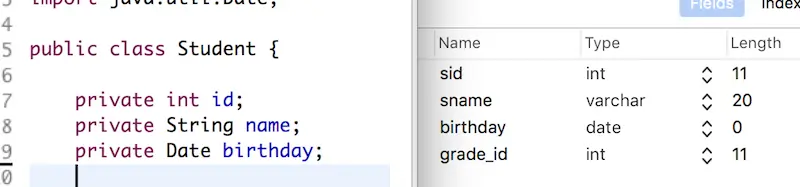
例如下面实体类和实体类在数据库映射字段对比
//映射配置文件中
<mapper namespace="com.ogemray.dao.StudentDao">
	<select id="selectAll" resultMap="studentMap">
		select * from student
	</select>

	<resultMap type="com.ogemray.entity.Student" id="studentMap">
		<id property="id" column="sid"/>
		<result property="name" column="sname"/>
		<result property="birthday" column="birthday"/>
	</resultMap>
</mapper>
如上面代码,通过 <resultMap> 标签来指定实体类里面的属性和映射数据表里面字段一一对应关系,两者一样的可以省略指定。然后通过 <select> 标签里面的 resultMap 属性来引用提前设置好的 <resultMap> 标签。
六、resultMap 实现关联查询
MyBatis 框架也可以实现像 Hibernate 那样的关联查询,只不过是需要自己手动去配置。
在开始之前,先介绍下涉及到关联查询的两个标签 <association> 和 <collection> 里面的属性字段
| 属性 | 描述 |
|---|---|
| property | 映射到列结果的字段或属性 |
| javaType | 一个 Java 类的完全限定名,或一个类型别名 |
| column | 数据库的列名,注意: 要处理复合主键,你可以指定多个列名通过 column=”{prop1=col1,prop2=col2}” 这种语法来传递给嵌套查询语句。这会引起 prop1 和 prop2 以参数对象形式来设置给目标嵌套查询语句。 |
| select | 另外一个映射语句的 ID,可以加载这个属性映射需要的复杂类型。获取的在列属性中指定的列的值将被传递给目标 select 语句作为参数。 select 注 意 : 要处理复合主键,你可以指定多个列名通过 column= “ {prop1=col1,prop2=col2} “ 这种语法来传递给嵌套查询语句,这会引起 prop1 和 prop2 以参数对象形式来设置给目标嵌套查询语句。 |
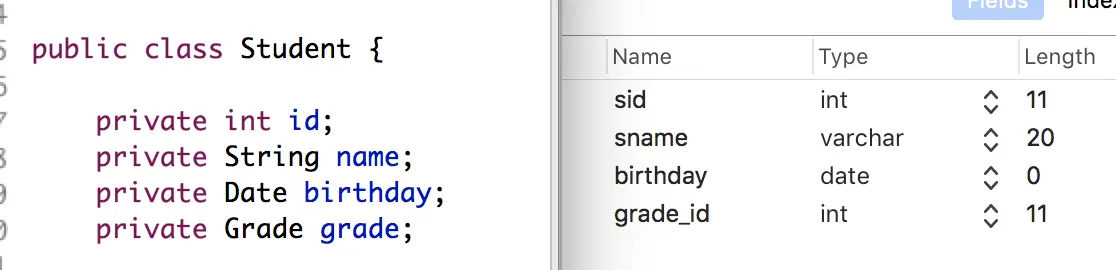
下面通过 Student 类和 Grade 类来建立关系进行关联查询示例

1. 通过连级方式实现关联查询
<mapper namespace="com.ogemray.dao.StudentDao">
	<select id="primaryCorrelationQueryById" resultMap="studentMap2">
		select
			s.sid sid,
			s.sname sname,
			s.birthday birthday,
			g.gid gid,
			g.gname gname
		from
			student s, grade g
		where
			s.sid = #{id} and s.sid = g.gid
	</select>

	<resultMap type="com.ogemray.entity.Student" id="studentMap2">
		<id property="id" column="sid"/>
		<result property="name" column="sname"/>
		<result property="birthday" column="birthday"/>
		<!-- 通过级联方法, 实现关联查询 -->
		<result property="grade.gid" column="gid"/>
		<result property="grade.gname" column="gname"/>
	</resultMap>
</mapper>
2. 使用 <association> 标签实现关联查询
<mapper namespace="com.ogemray.dao.StudentDao">
	<select id="correlationQueryById" resultMap="studentMap3">
		select
			s.sid sid,
			s.sname sname,
			s.birthday birthday,
			g.gid gid,
			g.gname gname
		from
			student s, grade g
		where
			s.sid = #{id} and s.sid = g.gid
	</select>

	<resultMap type="com.ogemray.entity.Student" id="studentMap3">
		<id property="id" column="sid"/>
		<result property="name" column="sname"/>
		<result property="birthday" column="birthday"/>
		<!-- 通过子标签 association, 实现关联查询 -->
		<association property="grade" javaType="com.ogemray.entity.Grade">
			<id property="gid" column="grade_id"/>
			<result property="gname" column="gname"/>
		</association>
	</resultMap>
</mapper>
3. 使用 <association> 标签实现分步关联查询
GradeMapper.xml 中
<mapper namespace="com.ogemray.dao.GradeDao">
	<select id="selectOneById" resultType="com.ogemray.entity.Grade">
		select * from grade where gid = #{id}
	</select>
</mapper>
StudentMapper.xml 中
<mapper namespace="com.ogemray.dao.StudentDao">
	<select id="substepCorrelationQueryById" resultMap="studentMap4">
		select * from student where sid = #{id}
	</select>

	<resultMap type="com.ogemray.entity.Student" id="studentMap4">
		<id property="id" column="sid"/>
		<result property="name" column="sname"/>
		<result property="birthday" column="birthday"/>
		<association property="grade"
					 select="com.ogemray.dao.GradeDao.selectOneById"
					 column="grade_Id">
		</association>
	</resultMap>
</mapper>
//分别执行SQL语句
DEBUG ==>  Preparing: select * from student where sid = ?
DEBUG ==> Parameters: 1(Integer)
DEBUG ====>  Preparing: select * from grade where gid = ?
DEBUG ====> Parameters: 1(Integer)
4. 使用 <collection> 标签实现 集合关联查询
<collection> 里属性 |
描述 |
|---|---|
property |
集合对应属性名 |
ofType |
集合包含元素类型 |
GradeMapper.xml 中
<mapper namespace="com.ogemray.dao.GradeDao">
	<select id="correlationQueryById" resultMap="gradeMap1">
		select
			g.gid gid,
			g.gname gname,
			s.sid sid,
			s.sname sname,
			s.birthday birthday
		from
			grade g, student s
		where
			g.gid = #{id} and g.gid = s.grade_id
	</select>

	<resultMap type="com.ogemray.entity.Grade" id="gradeMap1">
		<id property="gid" column="gid"/>
		<result property="gname" column="gname"/>

		<collection property="students" ofType="com.ogemray.entity.Student">
			<id property="id" column="sid"/>
			<result property="name" column="sname"/>
			<result property="birthday" column="birthday"/>
		</collection>
	</resultMap>
</mapper>
5. 使用 <collection> 标签实现 分步 集合关联查询
StudentMapper.xml 中
<mapper namespace="com.ogemray.dao.StudentDao">
	<select id="selectStudentsByGradeId" resultMap="resultMap1">
		select * from student where grade_id = #{gid}
	</select>

	<resultMap type="com.ogemray.entity.Student" id="resultMap1">
		<id property="id" column="sid"/>
		<result property="name" column="sname"/>
		<result property="birthday" column="birthday"/>
	</resultMap>
</mapper>
GradeMapper.xml 中
<mapper namespace="com.ogemray.dao.GradeDao">
	<select id="substepCorrelationQueryById" resultMap="gradeMap2">
		select * from grade where gid = #{id}
	</select>

	<resultMap type="com.ogemray.entity.Grade" id="gradeMap2">
		<id property="gid" column="gid"/>
		<result property="gname" column="gname"/>

		<collection property="students"
					select="com.ogemray.dao.StudentDao.selectStudentsByGradeId"
					column="gid">
			<id property="id" column="sid" />
			<result property="name" column="sname" />
			<result property="birthday" column="birthday" />
		</collection>
	</resultMap>
</mapper>
//分别执行SQL语句
DEBUG ==>  Preparing: select * from grade where gid = ?
DEBUG ==> Parameters: 1(Integer)
DEBUG ====>  Preparing: select * from student where grade_id = ?
DEBUG ====> Parameters: 1(Integer)
七、在分步查询的基础上配置懒加载
懒加载的概念,了解过 Hibernate 的肯定都不陌生,Hibernate 中涉及到关联查询的时候,懒加载是默认就开启着的,懒加载就是在关联查询中,真正需要用到关联对象的时候,才发起 sql 语句从数据库中查询数据,从而实现提升数据库性能的目的。 Mybatis 作为一个优秀的 ORM 框架当然也支持懒加载,和 Hibernate 不同是,它默认情况下是禁止了懒加载的,要使用懒加载需要手动的开启,开启的方法就是配置两个全局变量:lazyLoadingEnabled 设置为 true,aggressiveLazyLoading 设置为 false
| 设置参数 | 描述 | 有效值 | 默认值 |
|---|---|---|---|
| lazyLoadingEnabled | 延迟加载的全局开关。当开启时,所有关联对象都会延迟加载。 特定关联关系中可通过设置 fetchType 属性来覆盖该项的开关状态 | true/false | false |
| aggressiveLazyLoading | 当开启时,任何方法的调用都会加载该对象的所有属性。否则,每个属性会按需加载 | true/false | false (true in ≤3.4.1) |
<?xml version="1.0" encoding="UTF-8" ?>
<!DOCTYPE configuration
        PUBLIC "-//mybatis.org//DTD Config 3.0//EN"
        "http://mybatis.org/dtd/mybatis-3-config.dtd">
<configuration>
	<settings>
		<setting name="lazyLoadingEnabled" value="true"/>
		<setting name="aggressiveLazyLoading" value="false"/>
	</settings>
    ...
</configuration>
拿上面第六部分的 3 和 5 分别用 <association> 标签和 <collection> 标签实现的分步查询来做实验
1. 在 <association> 标签中实现懒加载
StudentMapper.xml 中
<mapper namespace="com.ogemray.dao.StudentDao">
    ...
    <resultMap type="com.ogemray.entity.Student" id="studentMap4">
        ...
        <association property="grade"
                     select="com.ogemray.dao.GradeDao.selectOneById"
                     column="grade_Id">
        </association>
    </resultMap>
</mapper>
执行测试代码
StudentDao mapper = sqlSession.getMapper(StudentDao.class);
Student student = mapper.substepCorrelationQueryById(1);
System.out.println(student.getName());
System.out.println(student.getGrade().toString());
控制台输出
DEBUG ==>  Preparing: select * from student where sid = ?
DEBUG ==> Parameters: 1(Integer)
DEBUG <==      Total: 1
Mike
DEBUG ==>  Preparing: select * from grade where gid = ?
DEBUG ==> Parameters: 1(Integer)
DEBUG <==      Total: 1
Grade [gid=1, gname=文科一班]
2. 在 <collection> 标签中实现懒加载
GradeMapper.xml 中
<mapper namespace="com.ogemray.dao.GradeDao">
    ...
    <resultMap type="com.ogemray.entity.Grade" id="gradeMap2">
        ...
        <collection property="students"
                    select="com.ogemray.dao.StudentDao.selectStudentsByGradeId"
                    column="gid">
            ...
        </collection>
    </resultMap>
</mapper>
执行测试代码
GradeDao mapper = sqlSession.getMapper(GradeDao.class);
Grade grade = mapper.substepCorrelationQueryById(1);
System.out.println(grade.getGname());
System.out.println(grade.getStudents().size());
控制台输出
DEBUG ==>  Preparing: select * from grade where gid = ?
DEBUG ==> Parameters: 1(Integer)
DEBUG <==      Total: 1
文科一班
DEBUG ==>  Preparing: select * from student where grade_id = ?
DEBUG ==> Parameters: 1(Integer)
DEBUG <==      Total: 2
2
3. 设置 fetchType 属性来配置单个关联查询的加载策略
在 <association> 标签和 <collection> 标签都都有 fetchType 这么个属性,他是用来指定该关联在查询时是否启用懒加载,本身是可选值,但是设定了之后将会取代全局的 lazyLoadingEnabled 设置。
有效值为 lazy 和 eager
八、MyBatis 动态 SQL
MyBatis 的强大特性之一便是它的动态 SQL。如果你有使用 JDBC 或其它类似框架的经验,你就能体会到根据不同条件拼接 SQL 语句的痛苦。例如拼接时要确保不能忘记添加必要的空格,还要注意去掉列表最后一个列名的逗号。利用动态 SQL 这一特性可以彻底摆脱这种痛苦。
动态 SQL 元素和 JSTL 或基于类似 XML 的文本处理器相似。在 MyBatis 之前的版本中,有很多元素需要花时间了解。MyBatis 3 大大精简了元素种类,现在只需学习原来一半的元素便可。MyBatis 采用功能强大的基于 OGNL 的表达式来淘汰其它大部分元素。
1. if
public interface StudentDao {
	public List<Student> selectStudentsByName(@Param("name") String name);
}
<mapper namespace="com.ogemray.dao.StudentDao">
	<select id="selectStudentsByName" resultMap="resultMap1">
		select * from student where 1=1
		<if test="name != null">
			and sname like #{name}
		</if>
	</select>
</mapper>
需要注意以下两点
① 在接口中加@Param 注解,以防止以下异常 ReflectionException: There is no getter for property named...
② if 标签里的 test 属性里是用的 OGNL 表达式,这是 apache 下的一个标签,用法类似 jstl,但有些小差别,具体的内容可以在 ognl 官网上查询,这里强调一点,有些符号在 xml 文件里写的时候,属于特殊符号,不能直接使用,我们可以在 w3cschool 里查http://www.w3school.com.cn/tags/html_ref_entities.html
2. choose, when, otherwise
<select id="selectStudentsByName" resultMap="resultMap1">
	select * from student where 1=1
	<choose>
		<when test="name != null">
			and sname like #{name}
		</when>
		<otherwise>
			and sid = 1
		</otherwise>
	</choose>
</select>
相当于平时用到的 if (condition) { } else { } 判断语句
3. where
<select id="selectStudentsByName" resultMap="resultMap1">
	select * from student
	<where>
		<if test="name != null">
			sname like #{name}
		</if>
	</where>
</select>
容易实现动态添加 where 语句 但是遇到 where 标签里面有多个条件语句该怎么办呢? 下面来看看 tirm 标签
4. trim
<select id="selectStudentsByName" resultMap="resultMap1">
	select * from student
	<where>
		<trim prefixOverrides="and">
			<if test="name != null">
				and sname like #{name}
			</if>
			<if test="name != null">
				and sid = 1
			</if>
		</trim>
	</where>
</select>

最终生成的 SQL语句
select * from student WHERE sname like ? and sid = 1
trim 标签可以动态对一段语句的首尾进行操作,下面来看下 trim 标签里面的其他属性:
- prefix:加前缀
- prefixOverrides:匹配的前缀去掉
- suffix:加后缀
- suffixOverrides:匹配的后缀去掉
5. set
public interface StudentDao {
	public int updateStudent(@Param("student") Student student);
}
<update id="updateStudent">
	update student
	<set>
		<if test="student.name != null">sname = #{student.name}</if>
	</set>
	<where>
		<if test="student.id != 0">sid = #{student.id}</if>
	</where>
</update>
利用 set 标签可以实现动态更新
6. foreach
平时开发中我们会遇到下面这样的查询语句
select * from student where sid in (1, 2, 3)
这个时候可以用 foreach 标签做到这样的效果
public interface StudentDao {
	public List<Student> selectPartStudent(@Param("sids") Integer[] sids);
}
<select id="selectPartStudent" resultMap="resultMap1">
	select * from student where sid in
	<foreach collection="sids"
			 item="id"
			 separator=","
			 open="("
			 close=")">
		#{id}
	</foreach>
</select>

最终生成的 SQL 语句
select * from student where sid in ( ? , ? , ? )
对上面 foreach 标签里面的几个属性做下解释
- collection=”ids”:接口上传过来的数值或 list 集合或者 map 集合都可以
- item=”id”:设定遍历集合或数组里的每一个值的迭代变量
- separator=”,”: 因为要构造出 (1,2,3)这种样子的字符串,设定中间的分隔符
- open=”(“: 因为要构造出 (1,2,3)这种样子的字符串,设定前缀的符号(
- close=”)”:因为要构造出 (1,2,3)这种样子的字符串,设计结尾的后缀)
- index:还有这个属性,数组或 list 集合的时候,设置索引变量,如果是 Map 集合就是 map 的 key 的迭代变量,这里的例子用不着这个。
7. bind
这个标签作用就是将 OGNL 标签里的值,进行二次加工,在绑定到另一个变量里,供其他标签使用。
例如在用到模糊查询时 方案一
public interface StudentDao {
	public List<Student> selectStudentsByName(@Param("name") String name);
}
<select id="selectStudentsByName" resultMap="resultMap1">
	select * from student where sname like #{name}
</select>
这时在调用的时候需要这么来写
mapper.selectStudentsByName("%m%");
方案二 用 bind 标签来实现就简单多了
<select id="selectStudentsByName" resultMap="resultMap1">
	<bind name="_name" value="'%' + name + '%'"></bind>
	select * from student where sname like #{_name}
</select>
这个时候调用就方便多了,模糊查询的效果同上面第一种方案一样
mapper.selectStudentsByName("m");
九、MyBatis 一级缓存
MyBatis 包含一个非常强大的查询缓存特性,它可以非常方便地配置和定制。MyBatis 3 中的缓存实现的很多改进都已经实现了,使得它更加强大而且易于配置。
Mybatis 和 Hibernate 一样,也有一级和二级缓存,同样默认开启的只有一级缓存,二级缓存也需要手动配置开启,我们先看看一级缓存。
一级缓存又被称为 session 级别的缓存,mybatis 一直默认是开启的,每个与数据库的连接会话都有各自自己的缓存,这些一级缓存之间是不能通信的,是相互独立的缓存空间!
总结: 一级缓存其实就是一个 Map,一个 session 对应一个 Map,所以说两个不同的 session 之间的一级缓存不共享,Map 里的 key 就是主键 id。所以查询对象的时候,先查缓存,缓存的 Map 对象中找不到时才会发送 SQL 语句,查询出来后会放到对应的缓存 Map 里。通过调用 session.clearCache() 可以用来清空缓存,同时增删改也会刷新缓存。
十、MyBatis 二级缓存
Mybatis 默认情况下二级缓存是关闭的,需要手工的配置开启,在开启之前,我们先说说二级缓存的基本知识点:
-
- 二级缓存又称为全局缓存,它是基于 namespace 级别的缓存,一个名称空间对应一个二级缓存,也就是说一般情况下同一个映射文件中的查询都共享一个共同的二级缓存空间。
-
- 一级缓存的生命周期随着一次会话 session 的关闭而清空,开启二级缓存的情况下,一级缓存里的数据,在清空或者提交之前会转存到二级缓存的空间中继续存在。
-
- 当一次会话 sqlsession 的缓存里如果存放着两个不同类型的对象,比如 Grade 和 Student 对象,当一级缓存清空之前,开起二级缓存的情况下,它们两个对象会分别存入各自的名称空间的二级缓存空间中。直白的说就是一级缓存中两个对象是放在同一 Map 对象(缓存就是 Map 对象),在二级缓存中两个对象是分别放在两个独立的 Map 对象里的(各自的缓存空间里)。
开启二级缓存步骤
① 设置全局变量 cacheEnabled 设置为 true
| 设置参数 | 描述 | 有效值 | 默认值 |
|---|---|---|---|
| cacheEnabled | 全局地开启或关闭配置文件中的所有映射器已经配置的任何缓存 | true/false | true |
<?xml version="1.0" encoding="UTF-8" ?>
<!DOCTYPE configuration
        PUBLIC "-//mybatis.org//DTD Config 3.0//EN"
        "http://mybatis.org/dtd/mybatis-3-config.dtd">
<configuration>
    <settings>
		...
		<!-- 开启二级缓存 -->
		<setting name="cacheEnabled" value="true"/>
    </settings>
    ...
</configuration>
② 在映射文件中添加一个标签
<?xml version="1.0" encoding="UTF-8" ?>
<!DOCTYPE mapper
        PUBLIC "-//mybatis.org//DTD Mapper 3.0//EN"
        "http://mybatis.org/dtd/mybatis-3-mapper.dtd">
<mapper namespace="com.ogemray.dao.StudentDao">
	<cache />
	...
</mapper>
这个简单语句的效果如下:
- 映射语句文件中的所有 select 语句将会被缓存。
- 映射语句文件中的所有 insert,update 和 delete 语句会刷新缓存。
- 缓存会使用 Least Recently Used(LRU,最近最少使用的)算法来收回。
- 根据时间表(比如 no Flush Interval,没有刷新间隔),缓存不会以任何时间顺序来刷新。
- 缓存会存储列表集合或对象(无论查询方法返回什么)的 1024 个引用。
- 缓存会被视为是 read/write(可读/可写)的缓存,意味着对象检索不是共享的,而且可以安全地被调用者修改,而不干扰其他调用者或线程所做的潜在修改。
这个标签中还有很多与缓存有关的属性: eviction:可用的收回策略有:
- LRU – 最近最少使用的,移除最长时间不被使用的对象。
- FIFO – 先进先出,按对象进入缓存的顺序来移除它们。
- SOFT – 软引用,移除基于垃圾回收器状态和软引用规则的对象。
- WEAK – 弱引用,更积极地移除基于垃圾收集器状态和弱引用规则的对象。
默认的是 LRU。
flushInterval:刷新间隔,可以被设置为任意的正整数,而且它们代表一个合理的毫秒形式的时间段。默认情况是不设置,也就是没有刷新间隔,缓存仅仅调用语句时刷新。 size:引用数目,可以被设置为任意正整数,要记住你缓存的对象数目和你运行环境的可用内存资源数目。默认值是 1024。 readOnly:(只读)属性可以被设置为 true 或 false。只读的缓存会给所有调用者返回缓存对象的相同实例,因此这些对象不能被修改,这提供了很重要的性能优势。可读写的缓存会返回缓存对象的拷贝(通过序列化) 。这会慢一些,但是安全,因此默认是 false。
<cache
  eviction="FIFO"
  flushInterval="60000"
  size="512"
  readOnly="true"/>
这个更高级的配置创建了一个 FIFO 缓存,并每隔 60 秒刷新,存数结果对象或列表的 512 个引用,而且返回的对象被认为是只读的,因此在不同线程中的调用者之间修改它们会导致冲突。
③ Mybatis 的二级缓存使用的序列化接口,所以,我们要使用二级缓存,我们的 JavaBean 就必须实现序列化接口
public class Student implements Serializable {
	private static final long serialVersionUID = 1L;
	...
}
代码测试
SqlSession sqlSession1 = sqlSessionFactory.openSession();
StudentDao mapper1 = sqlSession1.getMapper(StudentDao.class);
Student student1 = mapper1.selectOneById(1);
System.out.println(student1);
sqlSession1.close();

SqlSession sqlSession2 = sqlSessionFactory.openSession();
StudentDao mapper2 = sqlSession2.getMapper(StudentDao.class);
Student student2 = mapper2.selectOneById(1);
System.out.println(student2);
sqlSession2.close();
DEBUG ==>  Preparing: select * from student where sid = ?
DEBUG ==> Parameters: 1(Integer)
DEBUG <==      Total: 1
Student [id=1, name=Mike, birthday=Mon Nov 05 00:00:00 CST 2018, grade=null]

DEBUG Cache Hit Ratio [com.ogemray.dao.StudentDao]: 0.5
Student [id=1, name=Mike, birthday=Mon Nov 05 00:00:00 CST 2018, grade=null]
从上面可以看出,用两个不同的 session 查询同个对象只发送一次 SQL 语句。注意,在用另一个 session 查询前先将上个 session 关闭,这样才会将一级缓存里面的数据放到二级缓存里面。
注意
① 设置 useCache=false 可以禁用当前 select 语句的二级缓存,即每次查询都会发出 sql 去查询,默认情况是 true,即该 sql 使用二级缓存。
<select id="selectOneById" resultMap="resultMap1" useCache="false">
	select * from student where sid = #{id}
</select>
② 清空缓存 flushCache 属性
- flushCache 默认为 false,表示任何时候语句被调用,都不会去清空本地缓存和二级缓存。
- useCache 默认为 true,表示会将本条语句的结果进行二级缓存。
- 在 insert、update、delete 语句时: flushCache 默认为 true,表示任何时候语句被调用,都会导致本地缓存和二级缓存被清空。 useCache 属性在该情况下没有。例如如果 update 的时候如果 flushCache=”false”,则当你更新后,查询的数据数据还是老的数据。
如果没有去配置 flushCache、useCache,那么默认是启用缓存的
<select id="selectOneById"
		resultMap="resultMap1"
		useCache="true"
		flushCache="false">
	select * from student where sid = #{id}
</select>