知彼知己方能百战百胜,用 Spring Security 来满足我们的需求最好了解其原理,这样才能随意拓展,本篇文章主要记录 Spring Security 的基本运行流程。
过滤器
Spring Security 基本都是通过过滤器来完成配置的身份认证、权限认证以及登出。
Spring Security 在 Servlet 的过滤链(filter chain)中注册了一个过滤器 FilterChainProxy,它会把请求代理到 Spring Security 自己维护的多个过滤链,每个过滤链会匹配一些 URL,如果匹配则执行对应的过滤器。过滤链是有顺序的,一个请求只会执行第一条匹配的过滤链。Spring Security 的配置本质上就是新增、删除、修改过滤器。
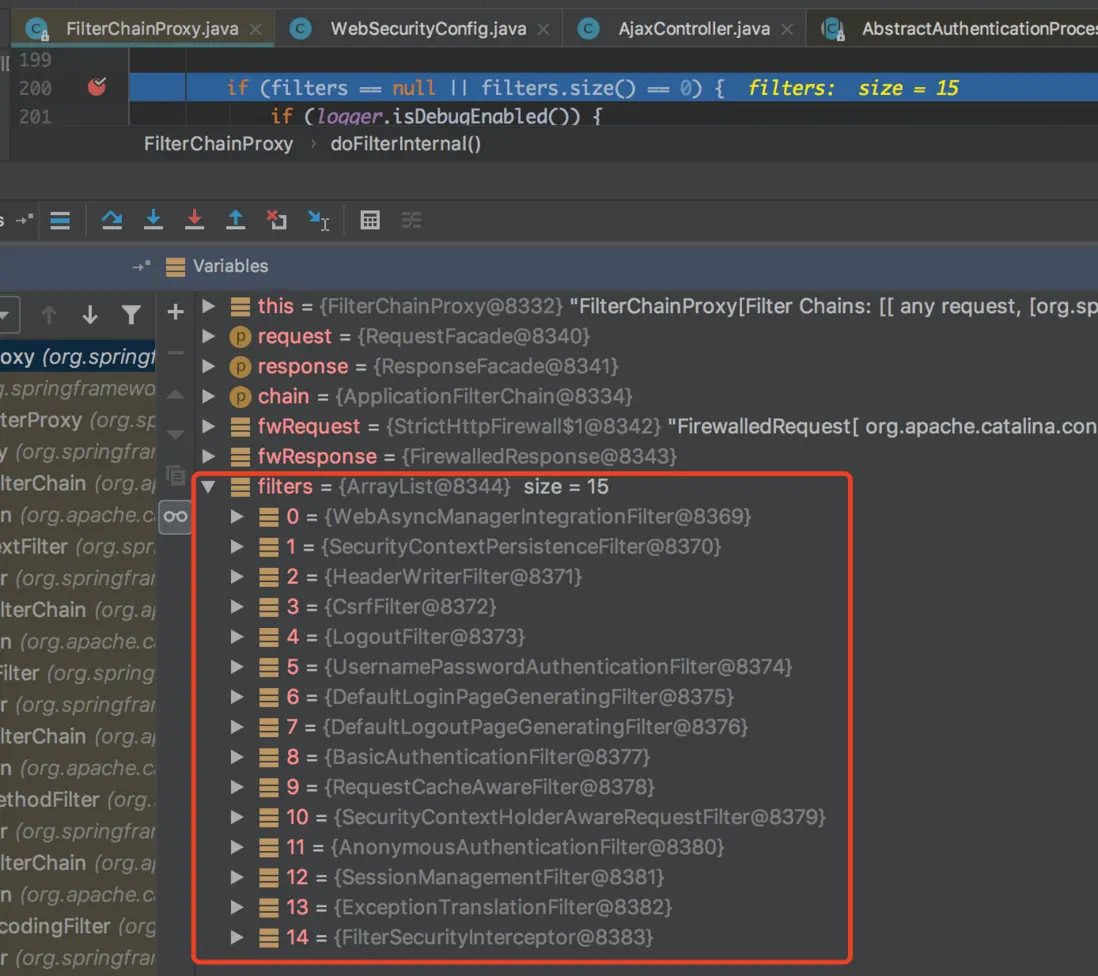
默认情况下系统帮我们注入的这 15 个过滤器,分别对应配置不同的需求。接下来我们重点是分析下 UsernamePasswordAuthenticationFilter 这个过滤器,他是用来使用用户名和密码登录认证的过滤器,但是很多情况下我们的登录不止是简单的用户名和密码,又可能是用到第三方授权登录,这个时候我们就需要使用自定义过滤器,当然这里不做详细说明,只是说下自定义过滤器怎么注入。
@Override
protected void configure(HttpSecurity http) throws Exception {

    http.addFilterAfter(...);
    ...
 }
身份认证流程
在开始身份认证流程之前我们需要了解下几个基本概念
1.SecurityContextHolder
SecurityContextHolder 存储 SecurityContext 对象。SecurityContextHolder 是一个存储代理,有三种存储模式分别是:
- MODE_THREADLOCAL:SecurityContext 存储在线程中。
- MODE_INHERITABLETHREADLOCAL:
SecurityContext存储在线程中,但子线程可以获取到父线程中的SecurityContext。 - MODE_GLOBAL:
SecurityContext在所有线程中都相同。SecurityContextHolder默认使用 MODE_THREADLOCAL 模式,SecurityContext存储在当前线程中。调用SecurityContextHolder时不需要显示的参数传递,在当前线程中可以直接获取到SecurityContextHolder对象。
//获取当前线程里面认证的对象
SecurityContext context = SecurityContextHolder.getContext();
Authentication authentication = context.getAuthentication();

//保存认证对象 (一般用于自定义认证成功保存认证对象)
SecurityContextHolder.getContext().setAuthentication(authResult);

//清空认证对象 (一般用于自定义登出清空认证对象)
SecurityContextHolder.clearContext();
2.Authentication
Authentication 即验证,表明当前用户是谁。什么是验证,比如一组用户名和密码就是验证,当然错误的用户名和密码也是验证,只不过 Spring Security 会校验失败。
Authentication 接口
public interface Authentication extends Principal, Serializable {
       //获取用户权限,一般情况下获取到的是用户的角色信息
       Collection<? extends GrantedAuthority> getAuthorities();
       //获取证明用户认证的信息,通常情况下获取到的是密码等信息,不过登录成功就会被移除
       Object getCredentials();
       //获取用户的额外信息,比如 IP 地址、经纬度等
       Object getDetails();
       //获取用户身份信息,在未认证的情况下获取到的是用户名,在已认证的情况下获取到的是 UserDetails (暂时理解为,当前应用用户对象的扩展)
       Object getPrincipal();
       //获取当前 Authentication 是否已认证
       boolean isAuthenticated();
       //设置当前 Authentication 是否已认证
       void setAuthenticated(boolean isAuthenticated);
}
3.AuthenticationManager ProviderManager AuthenticationProvider
其实这三者很好区分,AuthenticationManager 主要就是为了完成身份认证流程,ProviderManager 是 AuthenticationManager 接口的具体实现类,ProviderManager 里面有个记录 AuthenticationProvider 对象的集合属性 providers,AuthenticationProvider 接口类里有两个方法
public interface AuthenticationProvider {
    //实现具体的身份认证逻辑,认证失败抛出对应的异常
	Authentication authenticate(Authentication authentication)
			throws AuthenticationException;
    //该认证类是否支持该 Authentication 的认证
	boolean supports(Class<?> authentication);
}
接下来就是遍历 ProviderManager 里面的 providers 集合,找到和合适的 AuthenticationProvider 完成身份认证。
4.UserDetailsService UserDetails
在 UserDetailsService 接口中只有一个简单的方法
public interface UserDetailsService {
    //根据用户名查到对应的 UserDetails 对象
	UserDetails loadUserByUsername(String username) throws UsernameNotFoundException;
}
5.流程
对于上面概念有什么不明白的地方,在们在接下来的流程中慢慢分析
在运行到 UsernamePasswordAuthenticationFilter 过滤器的时候首先是进入其父类 AbstractAuthenticationProcessingFilter 的 doFilter() 方法中
public void doFilter(ServletRequest req, ServletResponse res, FilterChain chain)
        throws IOException, ServletException {
    ...
    //首先配对是不是配置的身份认证的URI,是则执行下面的认证,不是则跳过
    if (!requiresAuthentication(request, response)) {
        chain.doFilter(request, response);

        return;
    }
    ...
    Authentication authResult;

    try {
        //关键方法, 实现认证逻辑并返回 Authentication, 由其子类 UsernamePasswordAuthenticationFilter 实现, 由下面 5.3 详解
        authResult = attemptAuthentication(request, response);
        if (authResult == null) {
            // return immediately as subclass has indicated that it hasn't completed
            // authentication
            return;
        }
        sessionStrategy.onAuthentication(authResult, request, response);
    }
    catch (InternalAuthenticationServiceException failed) {
        //认证失败调用...由下面 5.1 详解
        unsuccessfulAuthentication(request, response, failed);

        return;
    }
    catch (AuthenticationException failed) {
        //认证失败调用...由下面 5.1 详解
        unsuccessfulAuthentication(request, response, failed);

        return;
    }

    // Authentication success
    if (continueChainBeforeSuccessfulAuthentication) {
        chain.doFilter(request, response);
    }
    //认证成功调用...由下面 5.2 详解
    successfulAuthentication(request, response, chain, authResult);
}
5.1 认证失败处理逻辑
protected void unsuccessfulAuthentication(HttpServletRequest request,
                                          HttpServletResponse response, AuthenticationException failed)
        throws IOException, ServletException {
    SecurityContextHolder.clearContext();
    ...
    rememberMeServices.loginFail(request, response);
    //该 handler 处理失败界面跳转和响应逻辑
    failureHandler.onAuthenticationFailure(request, response, failed);
}
这里默认配置的失败处理 handler 是 SimpleUrlAuthenticationFailureHandler,可自定义。
public class SimpleUrlAuthenticationFailureHandler implements
		AuthenticationFailureHandler {
	...

	public void onAuthenticationFailure(HttpServletRequest request,
			HttpServletResponse response, AuthenticationException exception)
			throws IOException, ServletException {
        //没有配置失败跳转的URL则直接响应错误
		if (defaultFailureUrl == null) {
			logger.debug("No failure URL set, sending 401 Unauthorized error");

			response.sendError(HttpStatus.UNAUTHORIZED.value(),
				HttpStatus.UNAUTHORIZED.getReasonPhrase());
		}
		else {
            //否则
            //缓存异常
			saveException(request, exception);
            //根据配置的异常页面是重定向还是转发进行不同方式跳转
			if (forwardToDestination) {
				logger.debug("Forwarding to " + defaultFailureUrl);

				request.getRequestDispatcher(defaultFailureUrl)
						.forward(request, response);
			}
			else {
				logger.debug("Redirecting to " + defaultFailureUrl);
				redirectStrategy.sendRedirect(request, response, defaultFailureUrl);
			}
		}
	}
    //缓存异常,转发则保存在request里面,重定向则保存在session里面
	protected final void saveException(HttpServletRequest request,
			AuthenticationException exception) {
		if (forwardToDestination) {
			request.setAttribute(WebAttributes.AUTHENTICATION_EXCEPTION, exception);
		}
		else {
			HttpSession session = request.getSession(false);

			if (session != null || allowSessionCreation) {
				request.getSession().setAttribute(WebAttributes.AUTHENTICATION_EXCEPTION,
						exception);
			}
		}
	}
}
这里做下小拓展:用系统的错误处理 handler,指定认证失败跳转的 URL,在 MVC 里面对应的 URL 方法里面可以通过 key 从request或session里面拿到错误信息,反馈给前端
5.2 认证成功处理逻辑
protected void successfulAuthentication(HttpServletRequest request,
                                        HttpServletResponse response, FilterChain chain, Authentication authResult)
        throws IOException, ServletException {
    ...
    //这里要注意很重要,将认证完成返回的 Authentication 保存到线程对应的 `SecurityContext` 中
    SecurityContextHolder.getContext().setAuthentication(authResult);

    rememberMeServices.loginSuccess(request, response, authResult);

    // Fire event
    if (this.eventPublisher != null) {
        eventPublisher.publishEvent(new InteractiveAuthenticationSuccessEvent(
                authResult, this.getClass()));
    }
    //该 handler 就是为了完成页面跳转
    successHandler.onAuthenticationSuccess(request, response, authResult);
}
这里默认配置的成功处理 handler 是 SavedRequestAwareAuthenticationSuccessHandler,里面的代码就不做具体展开了,反正是跳转到指定的认证成功之后的界面,可自定义。
5.3 身份认证详情
public class UsernamePasswordAuthenticationFilter extends
		AbstractAuthenticationProcessingFilter {
    ...
	public static final String SPRING_SECURITY_FORM_USERNAME_KEY = "username";
	public static final String SPRING_SECURITY_FORM_PASSWORD_KEY = "password";

	private String usernameParameter = SPRING_SECURITY_FORM_USERNAME_KEY;
	private String passwordParameter = SPRING_SECURITY_FORM_PASSWORD_KEY;
	private boolean postOnly = true;

	...
    //开始身份认证逻辑
	public Authentication attemptAuthentication(HttpServletRequest request,
			HttpServletResponse response) throws AuthenticationException {
		if (postOnly && !request.getMethod().equals("POST")) {
			throw new AuthenticationServiceException(
					"Authentication method not supported: " + request.getMethod());
		}

		String username = obtainUsername(request);
		String password = obtainPassword(request);

		if (username == null) {
			username = "";
		}

		if (password == null) {
			password = "";
		}

		username = username.trim();
        //先用前端提交过来的 username 和 password 封装一个简易的 AuthenticationToken
		UsernamePasswordAuthenticationToken authRequest = new UsernamePasswordAuthenticationToken(
				username, password);

		// Allow subclasses to set the "details" property
		setDetails(request, authRequest);
        //具体的认证逻辑还是交给 AuthenticationManager 对象的 authenticate(..) 方法完成,接着往下看
		return this.getAuthenticationManager().authenticate(authRequest);
	}
}
由源码断点跟踪得知,最终解析是由 AuthenticationManager 接口实现类 ProviderManager 来完成
public class ProviderManager implements AuthenticationManager, MessageSourceAware,
		InitializingBean {
	...
	private List<AuthenticationProvider> providers = Collections.emptyList();
	...

	public Authentication authenticate(Authentication authentication)
			throws AuthenticationException {
		....
        //遍历所有的 AuthenticationProvider, 找到合适的完成身份验证
		for (AuthenticationProvider provider : getProviders()) {
			if (!provider.supports(toTest)) {
				continue;
			}
            ...
			try {
                //进行具体的身份验证逻辑, 这里使用到的是 DaoAuthenticationProvider, 具体逻辑记着往下看
				result = provider.authenticate(authentication);

				if (result != null) {
					copyDetails(authentication, result);
					break;
				}
			}
			catch
            ...
		}
        ...
		throw lastException;
	}
}
DaoAuthenticationProvider 继承自 AbstractUserDetailsAuthenticationProvider 实现了 AuthenticationProvider 接口
public abstract class AbstractUserDetailsAuthenticationProvider implements
		AuthenticationProvider, InitializingBean, MessageSourceAware {
    ...
	private UserDetailsChecker preAuthenticationChecks = new DefaultPreAuthenticationChecks();
	private UserDetailsChecker postAuthenticationChecks = new DefaultPostAuthenticationChecks();
	...

	public Authentication authenticate(Authentication authentication)
			throws AuthenticationException {
		...
		// 获得提交过来的用户名
		String username = (authentication.getPrincipal() == null) ? "NONE_PROVIDED"
				: authentication.getName();
        //根据用户名从缓存中查找 UserDetails
		boolean cacheWasUsed = true;
		UserDetails user = this.userCache.getUserFromCache(username);

		if (user == null) {
			cacheWasUsed = false;

			try {
                //缓存中没有则通过 retrieveUser(..) 方法查找 (看下面 DaoAuthenticationProvider 的实现)
				user = retrieveUser(username,
						(UsernamePasswordAuthenticationToken) authentication);
			}
			catch
            ...
		}

		try {
            //比对前的检查,例如账户以一些状态信息(是否锁定, 过期...)
			preAuthenticationChecks.check(user);
            //子类实现比对规则 (看下面 DaoAuthenticationProvider 的实现)
			additionalAuthenticationChecks(user,
					(UsernamePasswordAuthenticationToken) authentication);
		}
		catch (AuthenticationException exception) {
			if (cacheWasUsed) {
				// There was a problem, so try again after checking
				// we're using latest data (i.e. not from the cache)
				cacheWasUsed = false;
				user = retrieveUser(username,
						(UsernamePasswordAuthenticationToken) authentication);
				preAuthenticationChecks.check(user);
				additionalAuthenticationChecks(user,
						(UsernamePasswordAuthenticationToken) authentication);
			}
			else {
				throw exception;
			}
		}

		postAuthenticationChecks.check(user);

		if (!cacheWasUsed) {
			this.userCache.putUserInCache(user);
		}

		Object principalToReturn = user;

		if (forcePrincipalAsString) {
			principalToReturn = user.getUsername();
		}
        //根据最终user的一些信息重新生成具体详细的 Authentication 对象并返回
		return createSuccessAuthentication(principalToReturn, authentication, user);
	}
    //具体生成还是看子类实现
	protected Authentication createSuccessAuthentication(Object principal,
			Authentication authentication, UserDetails user) {
		// Ensure we return the original credentials the user supplied,
		// so subsequent attempts are successful even with encoded passwords.
		// Also ensure we return the original getDetails(), so that future
		// authentication events after cache expiry contain the details
		UsernamePasswordAuthenticationToken result = new UsernamePasswordAuthenticationToken(
				principal, authentication.getCredentials(),
				authoritiesMapper.mapAuthorities(user.getAuthorities()));
		result.setDetails(authentication.getDetails());

		return result;
	}
}
接下来我们来看下 DaoAuthenticationProvider 里面的三个重要的方法,比对方式、获取需要比对的 UserDetails 对象以及生产最终返回 Authentication 的方法。
public class DaoAuthenticationProvider extends AbstractUserDetailsAuthenticationProvider {
    ...
    //密码比对
	@SuppressWarnings("deprecation")
	protected void additionalAuthenticationChecks(UserDetails userDetails,
			UsernamePasswordAuthenticationToken authentication)
			throws AuthenticationException {
		if (authentication.getCredentials() == null) {
			logger.debug("Authentication failed: no credentials provided");

			throw new BadCredentialsException(messages.getMessage(
					"AbstractUserDetailsAuthenticationProvider.badCredentials",
					"Bad credentials"));
		}

		String presentedPassword = authentication.getCredentials().toString();
        //通过 PasswordEncoder 进行密码比对, 注: 可自定义
		if (!passwordEncoder.matches(presentedPassword, userDetails.getPassword())) {
			logger.debug("Authentication failed: password does not match stored value");

			throw new BadCredentialsException(messages.getMessage(
					"AbstractUserDetailsAuthenticationProvider.badCredentials",
					"Bad credentials"));
		}
	}

    //通过 UserDetailsService 获取 UserDetails
	protected final UserDetails retrieveUser(String username,
			UsernamePasswordAuthenticationToken authentication)
			throws AuthenticationException {
		prepareTimingAttackProtection();
		try {
            //通过 UserDetailsService 获取 UserDetails
			UserDetails loadedUser = this.getUserDetailsService().loadUserByUsername(username);
			if (loadedUser == null) {
				throw new InternalAuthenticationServiceException(
						"UserDetailsService returned null, which is an interface contract violation");
			}
			return loadedUser;
		}
		catch (UsernameNotFoundException ex) {
			mitigateAgainstTimingAttack(authentication);
			throw ex;
		}
		catch (InternalAuthenticationServiceException ex) {
			throw ex;
		}
		catch (Exception ex) {
			throw new InternalAuthenticationServiceException(ex.getMessage(), ex);
		}
	}

    //生成身份认证通过后最终返回的 Authentication, 记录认证的身份信息
	@Override
	protected Authentication createSuccessAuthentication(Object principal,
			Authentication authentication, UserDetails user) {
		boolean upgradeEncoding = this.userDetailsPasswordService != null
				&& this.passwordEncoder.upgradeEncoding(user.getPassword());
		if (upgradeEncoding) {
			String presentedPassword = authentication.getCredentials().toString();
			String newPassword = this.passwordEncoder.encode(presentedPassword);
			user = this.userDetailsPasswordService.updatePassword(user, newPassword);
		}
		return super.createSuccessAuthentication(principal, authentication, user);
	}
}
加密
在 Spring Security 中加密是一个很简单却又不能忽略的模块,数据只有加密起来才更安全,这样就散算据库密码泄漏也都是密文。
Spring Security 为我们提供了一套加密规则和密码比对规则,org.springframework.security.crypto.password.PasswordEncoder 接口,该接口里面定义了三个方法。
public interface PasswordEncoder {

	//加密(外面调用一般在注册的时候加密前端传过来的密码保存进数据库)
	String encode(CharSequence rawPassword);

	//加密前后对比(一般用来比对前端提交过来的密码和数据库存储密码, 也就是明文和密文的对比)
	boolean matches(CharSequence rawPassword, String encodedPassword);

	//是否需要再次进行编码, 默认不需要
	default boolean upgradeEncoding(String encodedPassword) {
		return false;
	}
}
该接口实现类有下面这几个
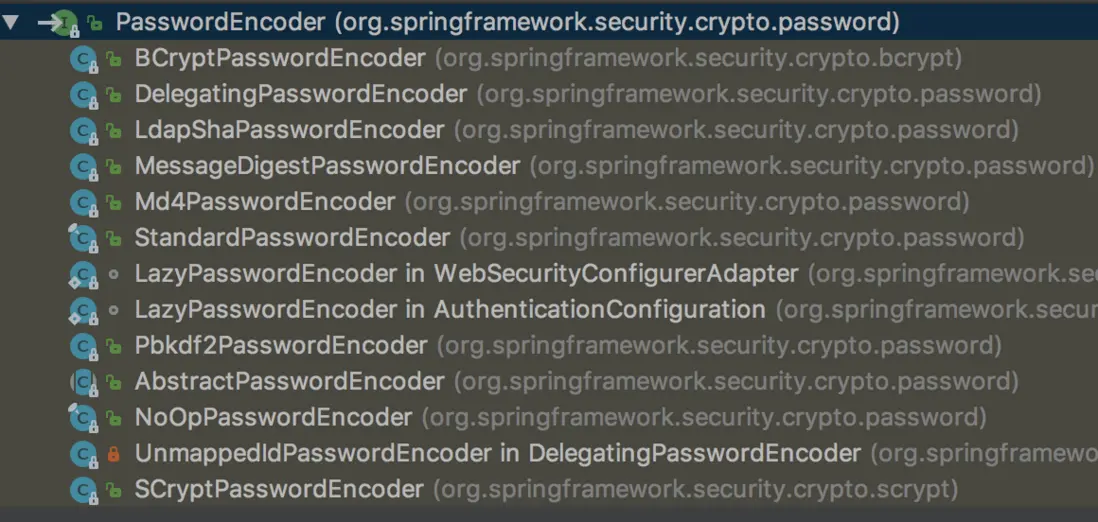
其中常用到的分别有下面这么几个
- BCryptPasswordEncoder:Spring Security 推荐使用的,使用 BCrypt 强哈希方法来加密。
- MessageDigestPasswordEncoder:用作传统的加密方式加密(支持 MD5、SHA-1、SHA-256…)
- DelegatingPasswordEncoder:最常用的,根据加密类型 id 进行不同方式的加密,兼容性强
- NoOpPasswordEncoder:明文, 不做加密
- 其他
MessageDigestPasswordEncoder
构造的时候需要传入算法字符串,例如 “MD5”、”SHA-1”、”SHA-256”…
String password = "123";

MessageDigestPasswordEncoder encoder = new MessageDigestPasswordEncoder("MD5");
String encode = encoder.encode(password);
System.out.println(encode);
System.out.println(encoder.matches(password,encode) == true ? "相等" : "不相等");
输出
{EUjIxnT/OVlk5J54s3LaJRuQgwTchm1gduFHTqI0qjo=}4b40375c57c285cc56c7048bb114db23
相等
调用 encode(..) 加密方法每次都会随机生成盐值,所以对相同的明文进行多次加密,每次结果也是不一样的。
从上面输出部分结合源码可以的出:加密的最终结果分为两部分,盐值 + MD5(password+盐值),调用 matches(..) 方法的时候先从密文中得到盐值,用该盐值加密明文和最终密文作对比。
BCryptPasswordEncoder
构造的时候可以传入哈希强度(strength),强度越大计算量就越大,也就意味着越安全,strength 取值区间[4-31],系统默认是 10。
String password = "123";

BCryptPasswordEncoder encoder = new BCryptPasswordEncoder();
String encode = encoder.encode(password);
System.out.println(encode);
System.out.println(encoder.matches(password, encode) == true ? "相等" : "不相等");
输出
$2a$10$lxPfE.Zvat6tejB8Q1QGYu3M9lXUUpiWFYzboeyK64kbfgN9v7iBq
相等
调用 encode(..) 方法加密跟上面一样,每次都会随机生成盐值,密文也分为两部分,盐值和最终加密的结果,最终对比的时候从密文里面拿出盐值对明文进行加密,比较最终加密后的结果。
DelegatingPasswordEncoder
这是 Spring Security 推出的一套兼容方案,根据加密类型 id 字符串(idForEncode)去自身缓存的所有加密方式中(idToPasswordEncoder)取出对应的加密方案对象对明文进行加密和对应密文的对比,只是其密文前面都加上了加密方案 id 的字符串,具体的咱们看下面代码演示。
其初始化 Spring Security 提供了一个工厂构造方法
public class PasswordEncoderFactories {

	@SuppressWarnings("deprecation")
	public static PasswordEncoder createDelegatingPasswordEncoder() {
		String encodingId = "bcrypt";
		Map<String, PasswordEncoder> encoders = new HashMap<>();
		encoders.put(encodingId, new BCryptPasswordEncoder());
		encoders.put("ldap", new org.springframework.security.crypto.password.LdapShaPasswordEncoder());
		encoders.put("MD4", new org.springframework.security.crypto.password.Md4PasswordEncoder());
		encoders.put("MD5", new org.springframework.security.crypto.password.MessageDigestPasswordEncoder("MD5"));
		encoders.put("noop", org.springframework.security.crypto.password.NoOpPasswordEncoder.getInstance());
		encoders.put("pbkdf2", new Pbkdf2PasswordEncoder());
		encoders.put("scrypt", new SCryptPasswordEncoder());
		encoders.put("SHA-1", new org.springframework.security.crypto.password.MessageDigestPasswordEncoder("SHA-1"));
		encoders.put("SHA-256", new org.springframework.security.crypto.password.MessageDigestPasswordEncoder("SHA-256"));
		encoders.put("sha256", new org.springframework.security.crypto.password.StandardPasswordEncoder());

		return new DelegatingPasswordEncoder(encodingId, encoders);
	}
}
这个工厂的静态构造方法把常用的几种方案都注入到缓存中,但是注入的 idForEncode 对应的却是 BCryptPasswordEncoder,这样系统就可以达到在新存储密码可以使用 BCryptPasswordEncoder 加密方案进行加密,但是对于数据库里面以前用其他方式加密的密码也支持比对。
String password = "123";

PasswordEncoder encoder = PasswordEncoderFactories.createDelegatingPasswordEncoder();
String encode = encoder.encode(password);
System.out.println(encode);
System.out.println(encoder.matches(password, encode) == true ? "相等" : "不相等");
输出
{bcrypt}$2a$10$Bh23zGZ2YPOsORNexoowb.fX4QH18GEh13eVtZUZvbe2Blx0jIVna
相等
从结果中可以看出,相比原始的 BCryptPasswordEncoder 密文前面多了加密方式的 id。
当然也可以自定义构造方法,来制定 DelegatingPasswordEncoder 用其他的方案进行加密。
接下来我们将其指定使用 MD5 方式来加密密码看看结果
Map<String, PasswordEncoder> encoders = new HashMap<>();
encoders.put("MD5", new MessageDigestPasswordEncoder("MD5"));
DelegatingPasswordEncoder encoder = new DelegatingPasswordEncoder("MD5", encoders);
String encode = encoder.encode(password);
System.out.println(encode);
System.out.println(encoder.matches(password, encode) == true ? "相等" : "不相等");
输出
{MD5}{XYwuzP8/lL/a3ASzA9UVM4rFs8lbsLvEoa5ydKER844=}d7f919bfd94554150f8ab3a809209ee3
相等
相比原始的 MessageDigestPasswordEncoder也是密文前面多了加密方式的 id。
应用
先示范下使用系统的 UserDetailsManager 来演示下简单的注入
@Configuration
@EnableWebSecurity
@EnableGlobalMethodSecurity(prePostEnabled = true, securedEnabled = true, jsr250Enabled = true)
public class WebSecurityConfig extends WebSecurityConfigurerAdapter {
    @Override
    public void configure(WebSecurity web) throws Exception {
        super.configure(web);
    }

    @Override
    protected void configure(AuthenticationManagerBuilder auth) throws Exception {
        auth.inMemoryAuthentication()
                .withUser("liuchao")
                    .password("{bcrypt}$2a$10$S.hMD3oV60YRIj38lHRhP.e3DAu3OwmssE/u/p2GLqqZ3SVsZA77W")
                    .roles("admin","user")
                    .and()
                .passwordEncoder(passwordEncoder);
    }

    @Bean(value = "passwordEncoder")
    public PasswordEncoder delegatingPasswordEncoder() {
        //构造 DelegatingPasswordEncoder 加密方案
        return PasswordEncoderFactories.createDelegatingPasswordEncoder();
    }

    @Autowired
    private PasswordEncoder passwordEncoder;
}